Telecom News,Mobile Solutions and more...
Best Solution to Disable Copy/Paste & Right Click on Website
6/03/2013 05:48:00 pm
There are a lot of JavaScript available to disable the right click and text selection on webpage but all of them lack the proper functions and almost all of them shows a annoying message when a user clicks on right mouse button like "Right click disabled' or "Copy/paste disabled".
I also faced a similar situation and after searching on Google, I found that there was no script that matches my requirements. So I have created a simple but very effective JavaScript that will disable the copying of text, images and right mouse button. This JavaScript will also disable the commands like Ctrl+C and Ctrl+V. The text will be replaced by your url if some one will try to copy the content from your site.
This is the code:
You can use this on any website that supports JavaScript including WordPress, blogger blogs and so on.
How to use this:
For blogger blogs, go to Layout> Add a gadget> HTML/JavaScript and paste the code shown above. Click on save.
Some of the unique features of this Javascript are:
Let me know what you think of this JavaScript.
I also faced a similar situation and after searching on Google, I found that there was no script that matches my requirements. So I have created a simple but very effective JavaScript that will disable the copying of text, images and right mouse button. This JavaScript will also disable the commands like Ctrl+C and Ctrl+V. The text will be replaced by your url if some one will try to copy the content from your site.
This is the code:
<script type="text/javascript">function mousedwn(e) { try { if (event.button == 2||event.button == 3) return false; } catch (e) { if (e.which == 3) return false; }
} document.oncontextmenu = function() { return false; } document.ondragstart = function() { return false; } document.onmousedown = mousedwn; </script>
<script language="JavaScript" type="text/javascript">if (top.location != self.location) top.location.replace(self.location);</script>
<meta http-equiv="imagetoolbar" content="no">
<script type="text/javascript">document.ondragstart = function(){return false;};</script>
<style type="text/css">*:not(input,textarea) {
-webkit-touch-callout: none; -webkit-user-select: none;}
img { -webkit-touch-callout: none; -webkit-user-select: none; } </style>
<script type='text/javascript'>window.addEventListener("keydown",function (e) { if (e.ctrlKey && (e.which == 65 || e.which == 67 || e.which == 85 || e.which == 80)) { e.preventDefault(); }}) document.keypress = function(e) { if (e.ctrlKey && (e.which == 65 || e.which == 67 || e.which == 85 || e.which == 80)) { } return false; };</script>
You can use this on any website that supports JavaScript including WordPress, blogger blogs and so on.
How to use this:
For blogger blogs, go to Layout> Add a gadget> HTML/JavaScript and paste the code shown above. Click on save.
Some of the unique features of this Javascript are:
- Disable right click on your site without showing annoying message.
- Disable copying of images.
- Prevents your users from using the commands like Ctrl+C and Ctrl+V.
- Very fast and easy to use
Let me know what you think of this JavaScript.
How to Remove Default Tab Extension in Google Chrome
5/25/2013 11:38:00 am
Default Tab extension is actually a browser hijacker extension and it usually comes along with free games or other products. After its installation, when you open the Google Chrome next time, a new default tab opens up with a search function instead of showing a blank page or the page you have set as homepage.

I also faced a similar situation when my brother installed a free game and this browser hijacker was packed with the game. After its installation, it changed the default tab in Google Chrome to a website with search option. I tried removing this extension by going to wrench menu > Extensions > Default tab but it showed up again next time. I tried deleting it from Add/Remove Programs but it comes again. Luckily I found a way to get rid of Default Tab extension.
Follow the steps given below to remove Default tab:
Step 1: Go to wrench icon > Extensions and remove the default tab extension.
Step 2: Close the Google Chrome.
Step 3: Go to Add/Remove programs and uninstall the Default tab.
Step 4: Open the Task Manager and kill the process "Default tab". The name of the process will be similar to default tab.
Step 5: Go to C:\Program Files and delete the folder "Default Tab".
Now open the Google Chrome and you will see that the Default tab extensions is gone now. Now run a virus scan to make sure that there are no other viruses on your computer.
I also faced a similar situation when my brother installed a free game and this browser hijacker was packed with the game. After its installation, it changed the default tab in Google Chrome to a website with search option. I tried removing this extension by going to wrench menu > Extensions > Default tab but it showed up again next time. I tried deleting it from Add/Remove Programs but it comes again. Luckily I found a way to get rid of Default Tab extension.
Follow the steps given below to remove Default tab:
Step 1: Go to wrench icon > Extensions and remove the default tab extension.
Step 2: Close the Google Chrome.
Step 3: Go to Add/Remove programs and uninstall the Default tab.
Step 4: Open the Task Manager and kill the process "Default tab". The name of the process will be similar to default tab.
Step 5: Go to C:\Program Files and delete the folder "Default Tab".
Now open the Google Chrome and you will see that the Default tab extensions is gone now. Now run a virus scan to make sure that there are no other viruses on your computer.
Check Your Polling Station Details By Sending SMS
5/11/2013 05:49:00 am
If you are still wondering where you are supposed to go and cast your vote and do not know your polling station then do not worry because you cane easily find out the details of your designated polling station by sending out a SMS.
Here is the procedure to check out your polling station:
 The reply will be in the Urdu language. The "silsila number" is the serial number. More than 40 million people have already availed this service. Do not waste time and check out your polling station now if you want to to cast your vote.
You can send multiple SMS to 8300 to find the polling station of all of your family members.
Here is the procedure to check out your polling station:
- Create a new SMS
- Enter your CNIC with dashes
- Send the SMS to 8300
You can send multiple SMS to 8300 to find the polling station of all of your family members.
Payoneer Global Bank Transfers now Available in Pakistan
5/04/2013 04:19:00 pm
Payoneer has just announced a new update via their blog that Pakistani Rupees is now added to list of supported currencies for Global Bank Transfer services. Recently they added Kenyan shillings and now PKR!
The service will not be so expensive as it only costs $2.99 per payment and users can receive their payments from the Payoneer partners in Pakistani Rupee instead of US Dollar ($). Payoneer is providing a number of services like US payment service (Direct deposit), card to card payment, Global Bank Transfer, receiving funds directly on your card etc.
If you are already using the Payoneer Global Bank Transfer service and want to recieve funds in PKR instead of US Dollar, then contact the Payoneer service department at
lbt@payoneer.com.
The service will not be so expensive as it only costs $2.99 per payment and users can receive their payments from the Payoneer partners in Pakistani Rupee instead of US Dollar ($). Payoneer is providing a number of services like US payment service (Direct deposit), card to card payment, Global Bank Transfer, receiving funds directly on your card etc.
If you are already using the Payoneer Global Bank Transfer service and want to recieve funds in PKR instead of US Dollar, then contact the Payoneer service department at
lbt@payoneer.com.
Boost Your Download Speed with Internet Turbo 2013
4/26/2013 07:45:00 am
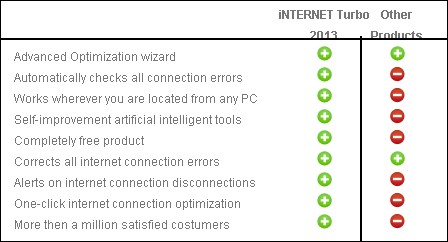
Internet Turbo 2013 is a revolutionary software which optimizes and speed up all your internet activities like downloading, uploading etc. Internet Turbo has become a threat for its competitors because it is totally free to use and way better than those paid software.
Some of the features of this amazing software are:
Save your Time:
Are you tired of your slow internet connection and looking for a way to speed things up...then Internet Turbo is your solution. With its amazing built-in technology, Internet Turbo speeds up your online activities like web browsing, downloading, uploading, video streaming, sharing and more.
Save your Money:
Yes you have heard right. This software is totally free to use. Now there is no need to waste your money on those stupid software.
Stay Connected:
Internet Turbo includes a function "forever connected" which prevents your internet connection from being disconnected by your ISP. Most of the ISPs have some sort of fixed time period after which you will be automatically disconnected. Internet Turbo prevents those unwanted disconnections.
Download:
Click Here to download "Internet Turbo 2013" totally free.
Some of the features of this amazing software are:
Save your Time:
Are you tired of your slow internet connection and looking for a way to speed things up...then Internet Turbo is your solution. With its amazing built-in technology, Internet Turbo speeds up your online activities like web browsing, downloading, uploading, video streaming, sharing and more.
Save your Money:
Yes you have heard right. This software is totally free to use. Now there is no need to waste your money on those stupid software.
Stay Connected:
Internet Turbo includes a function "forever connected" which prevents your internet connection from being disconnected by your ISP. Most of the ISPs have some sort of fixed time period after which you will be automatically disconnected. Internet Turbo prevents those unwanted disconnections.
Comparison between Internet Turbo and Others
Click Here to download "Internet Turbo 2013" totally free.
PTCL Now Offering 100Mbps Broadband Connection
4/22/2013 03:54:00 pm
PTCL is now offering high speed broadband internet services over FTTH in limited areas of Lahore, Islamabad and Karachi. We have found this news in a marketing brochure being distributed by PTCL employees in select areas. According to it, the price of 100Mbps Broadband Connection will be Rs 25,999.
Have a look at the marketing brochure:
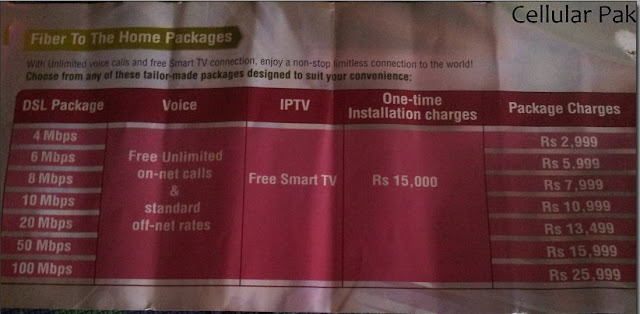
Initially it will be launched in Sector F-11 of Islamabad (limited connections) which indicates that it will be their testing hub. This service is still in the beta testing mode and is not launched on full scale.
The prices of the high speed internet will be:
Have a look at the marketing brochure:
Initially it will be launched in Sector F-11 of Islamabad (limited connections) which indicates that it will be their testing hub. This service is still in the beta testing mode and is not launched on full scale.
The prices of the high speed internet will be:
- 4 Mbps - Rs 2,999
- 6 Mbps - Rs 5,999
- 8 Mbps - Rs 7,999
- 10 Mbps - Rs 10,999
- 50 Mbps - Rs 15,999
- 100 Mbps - Rs 25,999
Subscribe to:
Posts
(
Atom
)

