Telecom News,Mobile Solutions and more...
Showing posts with label PTCL. Show all posts
Showing posts with label PTCL. Show all posts
How to Change Wi-Fi Password of PTCL ADSL Modem
7/09/2013 06:55:00 pm
Finally your neighbourhood tech savvy kid has hacked your password or you just simply want to change the password of your Wi-Fi then do not worry because I have created a full tutorial for you on how you can change your Wi-Fi password of PTCL ADSL modem. Follow the steps given below to change the password easily.
Step 1:
First make sure you are connected to the internet. Then open up your browser.
Step 2:
Type 192.168.1.1 in the address bar and press enter. You will be asked to enter "User name" and "password".

By default both the username and password is "admin". Enter admin for both username and password and click on login. If you have changed the username and password then enter it. In case if you have forgot the username and password, then call the customer support and request them to change the username and password to default values.
Step 3:
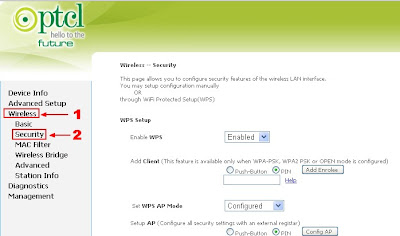
Once logged in, click on Wireless > Security present in the sidebar.
Step 4:
Change the password to anything you want. Remember to use a secure password to make sure it doesn't get hacked or stolen in near future. A combination of upper-case, lower-case letters and numbers is the ideal formula of a secure password. Once you have set the password, click on apply/save button. Also save it on a notepad or somewhere safe for future safe.
Step 1:
First make sure you are connected to the internet. Then open up your browser.
Step 2:
Type 192.168.1.1 in the address bar and press enter. You will be asked to enter "User name" and "password".
By default both the username and password is "admin". Enter admin for both username and password and click on login. If you have changed the username and password then enter it. In case if you have forgot the username and password, then call the customer support and request them to change the username and password to default values.
Step 3:
Once logged in, click on Wireless > Security present in the sidebar.
Then scroll down to the bottom and look for WPA/WAPI passphrase. This is the password of the Wi-Fi.
Step 4:
Change the password to anything you want. Remember to use a secure password to make sure it doesn't get hacked or stolen in near future. A combination of upper-case, lower-case letters and numbers is the ideal formula of a secure password. Once you have set the password, click on apply/save button. Also save it on a notepad or somewhere safe for future safe.
PTCL Now Offering 100Mbps Broadband Connection
4/22/2013 03:54:00 pm
PTCL is now offering high speed broadband internet services over FTTH in limited areas of Lahore, Islamabad and Karachi. We have found this news in a marketing brochure being distributed by PTCL employees in select areas. According to it, the price of 100Mbps Broadband Connection will be Rs 25,999.
Have a look at the marketing brochure:
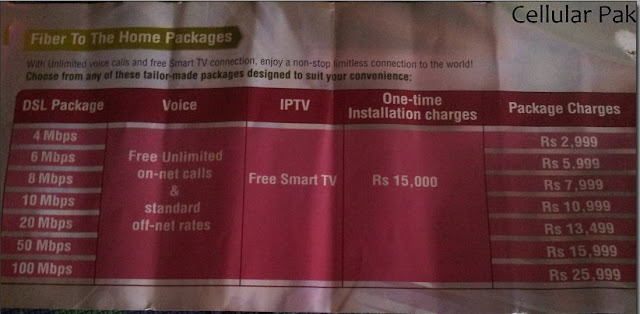
Initially it will be launched in Sector F-11 of Islamabad (limited connections) which indicates that it will be their testing hub. This service is still in the beta testing mode and is not launched on full scale.
The prices of the high speed internet will be:
Have a look at the marketing brochure:
Initially it will be launched in Sector F-11 of Islamabad (limited connections) which indicates that it will be their testing hub. This service is still in the beta testing mode and is not launched on full scale.
The prices of the high speed internet will be:
- 4 Mbps - Rs 2,999
- 6 Mbps - Rs 5,999
- 8 Mbps - Rs 7,999
- 10 Mbps - Rs 10,999
- 50 Mbps - Rs 15,999
- 100 Mbps - Rs 25,999
PTCL Home Entertainment Upsized - Discount on SmartTV
3/23/2013 08:48:00 am
PTCL has announced a new promotional offer for its service SMARTTV for the special day 23rd March 2013. Order SmartTV today and get exclusive discounts for the next 2 years! Pakistan - Let the celibration begins !

The customers who will order for SmartTV today will only have to pay Rs 600 (monthly service fee) and monthly device installment fee Rs 600 for 2 years. Remember this offer is only valid for a limited only.
PTCL Smart TV Jadoo plus brings premium content to your television in high definition (HD). Get loads of hit movies, on demand TV shows, pause-rewind function, songs and a lot more.
Features of PTCL Smart TV:
Note:
- Device is also available on upfront payment of Rs 10,000.
- Terms and conditions apply.
- This offer is 23rd march special. (As seen on newspapers).
The customers who will order for SmartTV today will only have to pay Rs 600 (monthly service fee) and monthly device installment fee Rs 600 for 2 years. Remember this offer is only valid for a limited only.
PTCL Smart TV Jadoo plus brings premium content to your television in high definition (HD). Get loads of hit movies, on demand TV shows, pause-rewind function, songs and a lot more.
Features of PTCL Smart TV:
- Full HD 1080 pixel
- 2 USB slots for external data drive/Wi-Fi adapter
- HDMI compatible output support in addition to AV output
- user friendly electronic program guide
- 125 local + international channels
Note:
- Device is also available on upfront payment of Rs 10,000.
- Terms and conditions apply.
- This offer is 23rd march special. (As seen on newspapers).
Recharge Your Vfone and get 1000 RS Balance
1/10/2013 07:52:00 am
PTCL has launched a new re-activation offer for its Vfone customers. Recharge your Vfone today and win balance of Rs 1000 totally free.
 If you have not recharged your phone since 10 August 2012 then then call or SMS on 7711 and get free balance of 1000 PKR. For more information dial 1236.

* This offer is for a limited time only.
** Terms and conditions apply.
* This offer is for a limited time only.
** Terms and conditions apply.
PTCL VIDEOCON Service
8/28/2012 07:01:00 am
With PTCL video conference service, connect with your loved ones and start the conversation face to face.
 Connect your video phone with PTCL broadband device and enjoy video calls with your friends and family. Get your video phone today and enjoy the video calls.
Video Phone service is now available in all cities of Pakistan. In simple words you can say:
Terms and Conditions:
Video Phone service is now available in all cities of Pakistan. In simple words you can say:
Connect - See - TalkEnjoy free video calls and broadband service for 6 months on ordering your video phone in just Rs 1500. For order, call 0800 8 0800.
Terms and Conditions:
- Offer is only for customers having broadband connection of 1-4 Mb.
- This is a limited time offer.
- Terms and conditions apply.
PTCL Broadband Ramadan Package
7/23/2012 07:29:00 am
PTCL offers discounted rates for its broadband customers in Ramadan Package. Now get 4MB speed in the price of 2MB (1,499 Rs).
How you can get benefit from it:
 |
| PTCL Broadband Ramadan Package |
- Listen tilawat of Holy Quran and download it.
- Watch Namaz-e-Tarawih live from Khana Kaba in HD.
- Study Islamic history and gain kowledge.
For upgrade dial 1236.
Who is eligible for this offer:
Customers using 1 MB and 2 MB connection can avail this offer.
Offer Validation period:
This is a limited time offer. Offer is valid from 20 July to 30 September 2012.
For a new broadband connection dial 0800 8 0800.
Make your 3G EVO a Wi-Fi Hotspot
6/25/2012 05:51:00 am
Now you can make your 3G EVO a Wi-Fi hotspot and upto 5 users can connect to it.
 Simply connect 3G EVO dongle with Tenda powered by 3G EVO and connect up to 5 users on the go.
Convert your 3G EVO or 3G EVO nitro into a Wi-Fi hotspot with Tenda, while enjoying seamless roaming in more than 200 cities across Pakistan.

Convert your 3G EVO or 3G EVO nitro into a Wi-Fi hotspot with Tenda, while enjoying seamless roaming in more than 200 cities across Pakistan.
- The price of Tenda is 4000 Rs.
- Terms and conditions apply.
- It is available at selected PTCL OSS and retailers.
EVO Droid-Pakistan's First 3G smartphone
4/21/2012 07:20:00 am
EVO Droid is the Pakistan's 1st 3G Android Smartphone.

- Android 2.2 OS
- HVGA TFT touch screen
- 3G WI-Fi hotspot for sharing of 3G & Wi-Fi
- 512 MB Flash Rom and 256 MB DRAM
- 4 GB External memory card
- Wi-Fi, Bluetooth, G-sensor
- Simultaneous use of GSM and 3G EVO
- All sims are acceptable in this smartphone
Packages:
These are launch offers currently available:
Evo Wind: Smartphone + 15 GB data = Rs 17,999
Evo Wings: Smartphone + 5 GB data = Rs 16,999
Sales Location:

Warranty:
EVO Droid comes with a 1 year warranty.
"EVO Droid-Touch N Play"

How To Open filestube.com In Pakistan?
3/31/2012 06:01:00 pm
How To Open filestube.com In Pakistan?Filestube.com is a good source for free downloads. They show the files available to download from all major file sharing sites but sadly FilesTube has been blocked by PTCL because the site also shows some results not suitable for people of all ages. Every thing has negative and positive effects. With the ban of Filestube, the Pakistani internet users are no longer able to get latest movies, softwares and music for free. The good point is that the youth will be saved from {not suitable content}.
There are still lot of ways to open FilesTube but i am not going it to share. Alternatively you can GeneralFIles.com. This is also a good search engine for finding files.
PTCL Giving away Free WiFi Modems
3/14/2012 11:58:00 am
PTCL is Giving away Free WiFi Modems for every new DSL connection, except for 256 kb & student package subscribers.
Earlier WiFi Modem/routers were given to customers at a fixed but recurring monthly rental, which is now waived off against one time charge of Rs. 750.
Along with, PTCL increased the tariff for new 1 Mbps package from Rs. 1,199 per month to Rs. 1,250 per month. Old customers will keep paying the old rates, i.e. Rs. 1,199 per month.
Check below terms for more details:
1Mbps Broadband:
- Rs. 1,250 per month
- Provisioning of free Wi-Fi modem
In addition to increase in 1Mbps package charges for new customers only, following changes will be applicable from March 5, 2012 as part of free Wi-Fi policy.
- Existing 1Mbps customers will continue to pay Rs. 1,199 per month
- Wi-Fi modems will be provided to new customers of all packages excluding 256Kbps and 1Mbps Student package, and there will be no monthly recurring charges.
- All existing subscribers irrespective of their packages will be charged Rs. 750 as modem up-gradation charges, and their package charges will remain as per policy
- Existing Wi-Fi customers will continue to pay as per existing policy
- Bundled packages (Double Up and Double Impact etc.) and triple-play services will be provided free of cost Wi-Fi modem upon installation and there will be no monthly recurring charges
Following are monthly broadband tariff for PTCL DSL customers:
- 1Mbps at Rs 1,250
- 2Mbps at Rs 1,499
- 4Mbps at Rs 1,999
- 6Mbps at Rs 4,999
- 8Mbps at Rs 6,999
- 10Mbps at Rs 9,999
Rs. 5,000 per month will be charged for greater than 300 GBs downloads. This is applicable on 1 Mbps to 8 Mbps DSL Connections.
PTCL claims to have acquired 95 percent of the DSL market share with increase of 17 percent subscribers’ base in the first half of the current financial year 2011-12. PTCL says that it is offering DSL services in over 1,000 town/cities across Pakistan.
On a side note, PTCL is hard trying to push its DSL sales. For the purpose, company is offering an incentive of Rs. 300 to be given to any employee who refers a DSL broadband order, after successful deployment of the connection and payment of the first bill.
Products From Amazon:
Products From Amazon:
PTCL 3G EVO Tab Specifications, Prices
10/23/2011 09:15:00 am
Specifications I Download
Size & Weight:
Size & Weight: 199mm x 114mm x 12mm7.8" x 4.5" x 0.47"

Weight: 429 grams
 Processor: Qualcomm MSM7627T (Turbo) 800Mhz multicore processor for seamless multitasking and superfast browsing.
Quad-core Turbo Processor
800 Mhz Application Processor
400 Mhz Communication/Modem Processor
320 Mhz DSP for Multimedia
Adreno 200 GPU (with support for Open GL 1.0/ES 2.0)

 Display: 7” screen WVGA LCD 800 X 480 resolution Capacitive touch screen Multi-Touch
 Memory: Internal Storage: 512 MB
RAM: 512 MB
Expansion Slot: microSD™ memory card (up to 32 GB)
Actual available internal storage may differ depending on software configuration of your tablet.
 Camera5 Megapixel rear camera with Auto Focus
VGA Secondary front Camera for Video Conferencing
 Operating System:Android Froyo OS 2.2
 Internet:Wi-Fi®: IEEE 802.11 b/g
Evo 3G Wireless Broadband with speeds up to 3.1 MBPS
 Bluetooth ®:Bluetooth EDR 2.1 technology for secure simple pairing
 Location:A-GPS for faster location tracking
Digital Compass
Wi-Fi
Cellular
 Cellular & Wireless:
 CDMA/ EVDO: Supports EVDO/CDMA 1X 1900Mhz,
Quad-band GSM/GPRS/ EDGE/UMTS: 850/900/1800/1900/ UMTS 2100Mhz
Dual Mode: EVDO or UMTS
 Sensors:G-Sensor – for auto rotation & gaming Light Sensor – adjusts auto brightness
 Input/output:3.5 mm stereo audio jack
Standard mico-USB
TF card slot
2 SIM card Slots
Mini DC Jack
 Stereo Speakers For a richer movie watching and music listening experience
 Microphone built-in microphone for voice commands, voice calls & audio chat
 Power & Battery
Battery Type: Rechargeable Li-Ion
Battery Capacity: High Capacity 3500mAh Battery
Standby Time: Up to 140 hours
Video Playback: Up to 7hours
Internet browsing: Up to 4 hours
Design & Button

 In the Box
- 3G Evo Tab
- Stereo Earphones with Mic
- Micro USB Cable
- USB Power Adapter
- Free Sleeve Pouch
- Documentation
- Warranty Card
 Warranty1 Year after sales & service warranty. Please refer to limited warranty statement on Warranty Card placed inside the box for complete terms & conditions.
Colors
Grey Stone & Ivory White


Software Upgrade for PTCL EG EVO Tab
10/23/2011 09:12:00 am
We will like to thank you for giving us your valuable inputs and hope to bring many more enhancements with your feedback.
Software Release Version: MD70_PLUS_V2.10
V2.10 Enhancements:
- Portable Wi-Fi Hotspot
- USB Internet Tethering
- Language in Compass Calibration
- APN Widget Fix to enable & disable 3G connection
- G-Sensor/Accelerometer improved to allow better tilt control in games.
- Default Aps decreased to free up memory for more user Aps & faster performance
- Aps2SD Application installed by default to automatically prompt to move movable aps to SD card
Upgrade Options
- You can follow the simple DIY Step by Step Instructions Here. Visual Guide Here
- Visit our Authorized Service Partner Airlink Communication to get your Evo Tab updated.

Step by Step Guide for Updating Evo Tab:
- Download and copy “update.zip” file to your SD Card.
- Make sure your SD card is inserted in your Evo Tab.
- Backup your data and power off Evo Tab.
- Power on Evo Tab While holding down the Power & Volume(+) button for 10 seconds.
- You will first see the PTCL Boot logo and then enter into to the Service Mode.
- Press the back arrow key once.
- Press Volume (-) button once to select “apply sdcard:update.zip” option.
- Press the menu button to execute.
- Select “reboot system now” option and press menu button to execute.
- Device will reboot and update is completed.
Visual Guide Here
IMPORTANT NOTES:
- You will need an SD card to perform upgrade
- Do not unzip the “update.zip” file. Copy the zipped file to your SD card.
- Factory data reset will remove all user settings, data and applications. Please back up your data before performing factory data reset.
- If you have any difficulties in upgrading the software feel free to contact our support team.
Tips and Tricks for PTCL 3G Evo Tab
10/23/2011 09:09:00 am

How can I prolong my tab’s battery time?
Following are some of the factors that contribute towards quick drain out of the battery
- Non-stop data transfer using 3G & Wi-Fi.
- Setting display settings to Maximum Brightness
- Syncing applications running continuously in background.
- Be sure to turn your 3G & Wi-Fi connections Off while they are not in use.
- Set your screen brightness to “Auto Brightness” settings.
- For syncing applications, either increase the sync interval or avoid using syncing applications continuously.
To make optimal use of GPS for exact location determination, please use your Tab in open air and ensure to turn on your Wi-Fi, GPS, Assisted GPS & location; which will help to fetch your exact location. Please note that turning all of these connections on would increase your battery consumption, so be sure to turn them off after use.
Why does my tab get slowed down at times?
To make optimal use of your Tab’s processing power, please be sure
- Make sure that there is some free space in your SD card.
- Kill syncing apps running in the background which you do not want to use all the time.
- Kill idle background applications using Task killer App which can be easily downloaded from the android market Free of charge.
To make your camera work, please be sure that you have an SD card inserted into your tab’s SD card slot. Also make sure that you have ample free memory in your SD card for photo storage. On your installed Apps menu, you’ll find “SD card” icon, please use this function to move some of your downloaded content to your SD card to make your tab work more smoothly. Conversely you can also install “Apps to SD” application which automatically alerts you about the applications which can be moved to the SD card.
Can I use Skype to make video calls?
No, Skype for Android at present does not support Froyo 2.2 based gadgets, however you can use skype to make voice calls to your skype contacts.
PTCL 3G EVO TAB
10/23/2011 09:04:00 am
Super Fast 3G Speeds 
Experience browsing at Super fast speeds with Pakistan’s fastest 3G wireless broadband network EVO 3G at speeds of upto 3.1MBPS. With both Wi-Fi & 3G support browse without limitations 24/7 wherever you are & enjoy surfing, downloading and a lot more on –the-Go!Power of Android Froyo 2.2 
Packed with a full web browser and Internet surfing capabilities, the Android platform gives you access to over 250,000
applications through the Android Market including Gmail, Pandora and Facebook. plus the ability to play games, enjoy music and videos, navigate, send text messages, and make calls on your phone
Experience the Touch!
The 7“ high resolution LCD with multi-gesture capacitive touch screen delivers excellent screen sharpness. Pinch the screen to zoom in/out, rotate the tab to change the screen orientation or just slide to scroll up/ down or move on to thenext page.
One touch access to Communication, Navigation & Entertainment!
With a host of in-built communication apps, Evo Tab is your own mobile social hub that travels with you. The in-built applications include a line of Google apps such as Google voice search, full web browser & Gmail as well as Push access to any other mail service like Hotmail, Yahoo or even work mails. With TALK. get in touch through instant messaging or instantly connect with friends on FACEBOOK wherever you are.My Travel Companion! 
Never loose directions with EVO Tab’s in- built Google Maps, latitude & Navigator Apps. Need help in finding directions; no worries Just search for it in one of the navigation apps and you’ll get detailed road maps of your desired destination. With Voice search feature, simply talk to your EVO Tab & it will show you the way to your destination; how cool is that!New to the city? With “Places”, your EVO Tab becomes your guide and shows you the way to interesting sites such as shopping areas, & eateries close to you.
Experience Superb quality photos with 5MP Camera!
Enjoy Superb quality photos with dual cameras in your tab; front cam offers good clarity for video chats while the 5MP rear camera lets you capture great stills as well as HD quality real time videos On-the-Go Juke Box!
Rock out, Get groovy or just listen to some relaxing music with evo tab’s excellent sound quality. With Music apps in Android Market get access to millions of songs or listen to over 50,000 live radio channels while on-the-GoOn-the-Go Cinema & a thrilling Gaming Experience!
Enjoy cinema magic with HD quality movie playback at your Evo Tab or with YOUTUBE stream like a dream at 3G speeds.With a large multi-gesture capacitive screen experience gaming at its best with your EVO Tab.
 So go ahead feed your Angry birds addiction or indulge yourself in some thrilling arcade racing with a wide range of online as well as downloadable games from the android market!
Work or do some social networking!
With Evo tab one touch gives you real time access to your work emails, social media as well as instant messaging services. So Go ahead stay connected to your social networks & share through the pre-installed facebook & twitter apps. Make voice calls through Skype or video conference with friends or clients while on the move.With in-built Office suite, get your work done while on-the-move.
 With “Documents to Go” App; create, edit & view documents, spreadsheets or even power point presentations!
Subscribe to:
Posts
(
Atom
)

