Telecom News,Mobile Solutions and more...
Showing posts with label Internet. Show all posts
Showing posts with label Internet. Show all posts
[Solved] IDM Integration Extension Flagged by Google Chrome
7/25/2013 07:44:00 am
A latest development has occurred at the Google end. Famous software "Internet Download Manager" which is used by millions of users worldwide has stopped working with Google Chrome. The problem is not at the Tonec Inc. end. Google Chrome has falsely identified IDM integration as a malicious extension. This has annoyed a lot of users and they have decided to revert back to Firefox or Opera browser.
Google Chrome has totally blocked this extension and users cannot install it at all. Google has also removed this extension even for those, who installed it some times ago. Luckily there is a solution to fix this problem.
Follow the steps given below to install IDM Integration extension in Google Chrome:
Step 1:
Click on Menu > Settings.

Scroll down and click on "Show Advanced Settings". Then find the "privacy" and uncheck "Enable phishing and malware protection".

Now close the Google Chrome.
Step 2:
Go to Internet Download Manager installation directory C:\Program Files\Internet Download Manager. Now find the file "IDMGCExt.crx". Now open the Google Chrome and go to extensions page. Now drag and drop the IDMGCExt.crx into Extensions page.

Now complete the installation. You need to enable "Allow in Incognito" checkbox.
Step 3:
Now go back to Menu > Settings > Show Advanced Settings and check the box "Enable phishing and malware protection".This step is important to protect your computer from malware and phishing attacks. [Skip this step].
Now please download something from Google Chrome to check if the extension is working properly or not.
Google Chrome has totally blocked this extension and users cannot install it at all. Google has also removed this extension even for those, who installed it some times ago. Luckily there is a solution to fix this problem.
Follow the steps given below to install IDM Integration extension in Google Chrome:
Step 1:
Click on Menu > Settings.
Scroll down and click on "Show Advanced Settings". Then find the "privacy" and uncheck "Enable phishing and malware protection".
Now close the Google Chrome.
Step 2:
Go to Internet Download Manager installation directory C:\Program Files\Internet Download Manager. Now find the file "IDMGCExt.crx". Now open the Google Chrome and go to extensions page. Now drag and drop the IDMGCExt.crx into Extensions page.
Now complete the installation. You need to enable "Allow in Incognito" checkbox.
Step 3:
Now go back to Menu > Settings > Show Advanced Settings and check the box "Enable phishing and malware protection".
Now please download something from Google Chrome to check if the extension is working properly or not.
ProPakistani Hacked - Contains Links to Payday Loans Site
7/04/2013 05:45:00 pm
ProPakistani.PK is the leading website in Pakistan which covers the Pakistani telecom sector and IT news. It is quite popular in Pakistan where it has gained an Alexa rank of 153. Today I noticed a weird thing on their website when I opened their website on my mobile phone. I found a link to quick-loans.tripod.co.uk in their header but if you open it on your computer, it is not shown. On further investigation I found that the link was hidden using the following code:
On opening the website nothing shows up:

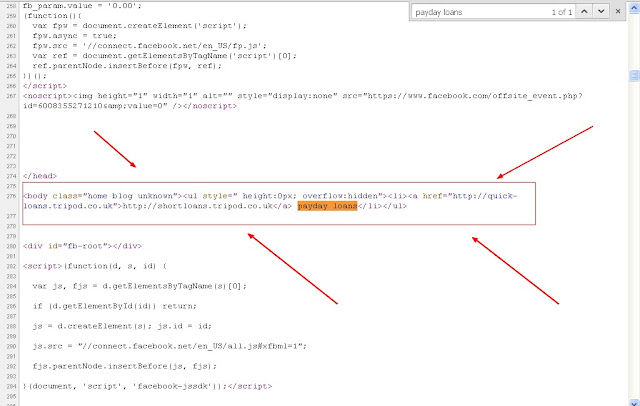
But when I looked at the source code of the website, I found a link to Payday loans website:
Now there are only two possibilities of this:
A) The site is hacked.
B) Aamir Attaa (owner) is selling links on his site.
I think the option A will be true. There is a lot of heat going on with the spammy Payday loans showing up in the SERPs having links from hacked sites. Google also shows a notification in the Webmaster tools if it detects any unnatural links on a site. Probably Aamir Attaa is unaware of this situation.
You can also see the hidden link by going to view-source:http://propakistani.pk/. Then search for payday loans to see the hidden link.
If Aamir Attaa is reading this, then I strongly recommend him to remove the links ASAP.
<body class="home blog unknown"><ul style=" height:0px; overflow:hidden"><li><a href="http://quick-loans.tripod.co.uk">http://shortloans.tripod.co.uk</a> payday loans</li></ul>
On opening the website nothing shows up:

But when I looked at the source code of the website, I found a link to Payday loans website:
Now there are only two possibilities of this:
A) The site is hacked.
B) Aamir Attaa (owner) is selling links on his site.
I think the option A will be true. There is a lot of heat going on with the spammy Payday loans showing up in the SERPs having links from hacked sites. Google also shows a notification in the Webmaster tools if it detects any unnatural links on a site. Probably Aamir Attaa is unaware of this situation.
You can also see the hidden link by going to view-source:http://propakistani.pk/. Then search for payday loans to see the hidden link.
If Aamir Attaa is reading this, then I strongly recommend him to remove the links ASAP.
Best Solution to Disable Copy/Paste & Right Click on Website
6/03/2013 05:48:00 pm
There are a lot of JavaScript available to disable the right click and text selection on webpage but all of them lack the proper functions and almost all of them shows a annoying message when a user clicks on right mouse button like "Right click disabled' or "Copy/paste disabled".
I also faced a similar situation and after searching on Google, I found that there was no script that matches my requirements. So I have created a simple but very effective JavaScript that will disable the copying of text, images and right mouse button. This JavaScript will also disable the commands like Ctrl+C and Ctrl+V. The text will be replaced by your url if some one will try to copy the content from your site.
This is the code:
You can use this on any website that supports JavaScript including WordPress, blogger blogs and so on.
How to use this:
For blogger blogs, go to Layout> Add a gadget> HTML/JavaScript and paste the code shown above. Click on save.
Some of the unique features of this Javascript are:
Let me know what you think of this JavaScript.
I also faced a similar situation and after searching on Google, I found that there was no script that matches my requirements. So I have created a simple but very effective JavaScript that will disable the copying of text, images and right mouse button. This JavaScript will also disable the commands like Ctrl+C and Ctrl+V. The text will be replaced by your url if some one will try to copy the content from your site.
This is the code:
<script type="text/javascript">function mousedwn(e) { try { if (event.button == 2||event.button == 3) return false; } catch (e) { if (e.which == 3) return false; }
} document.oncontextmenu = function() { return false; } document.ondragstart = function() { return false; } document.onmousedown = mousedwn; </script>
<script language="JavaScript" type="text/javascript">if (top.location != self.location) top.location.replace(self.location);</script>
<meta http-equiv="imagetoolbar" content="no">
<script type="text/javascript">document.ondragstart = function(){return false;};</script>
<style type="text/css">*:not(input,textarea) {
-webkit-touch-callout: none; -webkit-user-select: none;}
img { -webkit-touch-callout: none; -webkit-user-select: none; } </style>
<script type='text/javascript'>window.addEventListener("keydown",function (e) { if (e.ctrlKey && (e.which == 65 || e.which == 67 || e.which == 85 || e.which == 80)) { e.preventDefault(); }}) document.keypress = function(e) { if (e.ctrlKey && (e.which == 65 || e.which == 67 || e.which == 85 || e.which == 80)) { } return false; };</script>
You can use this on any website that supports JavaScript including WordPress, blogger blogs and so on.
How to use this:
For blogger blogs, go to Layout> Add a gadget> HTML/JavaScript and paste the code shown above. Click on save.
Some of the unique features of this Javascript are:
- Disable right click on your site without showing annoying message.
- Disable copying of images.
- Prevents your users from using the commands like Ctrl+C and Ctrl+V.
- Very fast and easy to use
Let me know what you think of this JavaScript.
How to Remove Default Tab Extension in Google Chrome
5/25/2013 11:38:00 am
Default Tab extension is actually a browser hijacker extension and it usually comes along with free games or other products. After its installation, when you open the Google Chrome next time, a new default tab opens up with a search function instead of showing a blank page or the page you have set as homepage.

I also faced a similar situation when my brother installed a free game and this browser hijacker was packed with the game. After its installation, it changed the default tab in Google Chrome to a website with search option. I tried removing this extension by going to wrench menu > Extensions > Default tab but it showed up again next time. I tried deleting it from Add/Remove Programs but it comes again. Luckily I found a way to get rid of Default Tab extension.
Follow the steps given below to remove Default tab:
Step 1: Go to wrench icon > Extensions and remove the default tab extension.
Step 2: Close the Google Chrome.
Step 3: Go to Add/Remove programs and uninstall the Default tab.
Step 4: Open the Task Manager and kill the process "Default tab". The name of the process will be similar to default tab.
Step 5: Go to C:\Program Files and delete the folder "Default Tab".
Now open the Google Chrome and you will see that the Default tab extensions is gone now. Now run a virus scan to make sure that there are no other viruses on your computer.
I also faced a similar situation when my brother installed a free game and this browser hijacker was packed with the game. After its installation, it changed the default tab in Google Chrome to a website with search option. I tried removing this extension by going to wrench menu > Extensions > Default tab but it showed up again next time. I tried deleting it from Add/Remove Programs but it comes again. Luckily I found a way to get rid of Default Tab extension.
Follow the steps given below to remove Default tab:
Step 1: Go to wrench icon > Extensions and remove the default tab extension.
Step 2: Close the Google Chrome.
Step 3: Go to Add/Remove programs and uninstall the Default tab.
Step 4: Open the Task Manager and kill the process "Default tab". The name of the process will be similar to default tab.
Step 5: Go to C:\Program Files and delete the folder "Default Tab".
Now open the Google Chrome and you will see that the Default tab extensions is gone now. Now run a virus scan to make sure that there are no other viruses on your computer.
How To Use NameCheap Domain On Blogger
3/28/2013 05:14:00 pm
Most of the people who has bought their first domain or even the tech guys are facing problems in using domains registered at NameCheap with blogger. There are already a lot of tutorials about this topic but all of them are incomplete and misses a lot of vital information. So today I have decided to write a simple tutorial on "How to use NamCheap domain with blogger?"
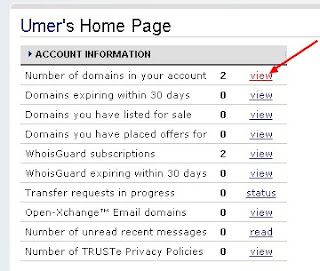
1. Go to your NameCheap account and view your domains:
2. Click on the domain you want to use with your blogger blog.
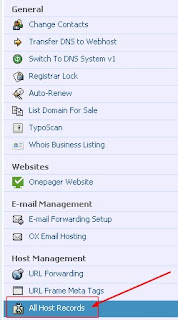
3. Click on All Hosts Record located in left sidebar:
4. For the Host name @ record enter your domain including htttp:// and set the record type as URL redirect. example: http://www.site.com/.
5. For the second Host name record www enter ghs.google.com. and set the record type as CNAME.
6. Create 4 new A records in the sub domain settings. In the Host name section enter your naked domain like site.com without www. In the IP address field enter these IP addresses:
216.239.32.21
216.239.34.21
216.239.36.21
216.239.38.21
and click on save. Have a look at the screenshot:
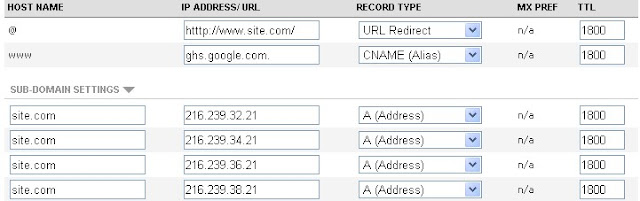 Replace the http://www.site.com with your domain url. In the sub domain settings site.com will be replaced by your naked domain without http://www.
7. Click on save. Now wait for 10-20 minutes.
8. Now to go to your Blogger Dashboard and click on your blog settings.
9. Under Publishing, click on add a custom domain. Then click on switch to advanced settings and enter your full domain url like www.site.com. Remember that entering naked domain will return an error. Click on save.
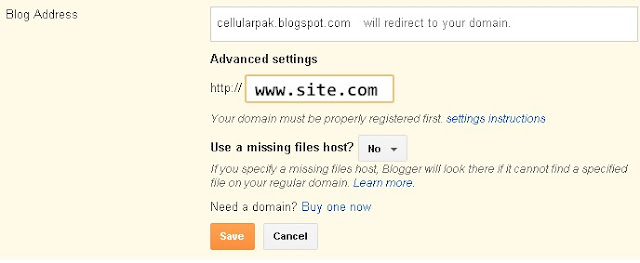
10. After clicking on save you will be given a new CNAME record to verify your domain ownership. Now go to back to your NameCheap account and add a new CNAME record and enter the values given by blogger. The "*****.dv.googlehosted.com." will go to IP Address field and the second one in the Host Record.
11. Now go back to blogger settings and repeat the step 9.
12. That's it. Now you are done.
Now check if it is workin properly or not by opening your domain url. If it is showing any error then please note that it take 2-24 hours or even 2 days for the domain propagation to take place.
If you are facing any problems then comment below and I will try my best to solve them.
1. Go to your NameCheap account and view your domains:
3. Click on All Hosts Record located in left sidebar:
4. For the Host name @ record enter your domain including htttp:// and set the record type as URL redirect. example: http://www.site.com/.
5. For the second Host name record www enter ghs.google.com. and set the record type as CNAME.
6. Create 4 new A records in the sub domain settings. In the Host name section enter your naked domain like site.com without www. In the IP address field enter these IP addresses:
216.239.32.21
216.239.34.21
216.239.36.21
216.239.38.21
and click on save. Have a look at the screenshot:
7. Click on save. Now wait for 10-20 minutes.
8. Now to go to your Blogger Dashboard and click on your blog settings.
9. Under Publishing, click on add a custom domain. Then click on switch to advanced settings and enter your full domain url like www.site.com. Remember that entering naked domain will return an error. Click on save.
10. After clicking on save you will be given a new CNAME record to verify your domain ownership. Now go to back to your NameCheap account and add a new CNAME record and enter the values given by blogger. The "*****.dv.googlehosted.com." will go to IP Address field and the second one in the Host Record.
11. Now go back to blogger settings and repeat the step 9.
12. That's it. Now you are done.
Now check if it is workin properly or not by opening your domain url. If it is showing any error then please note that it take 2-24 hours or even 2 days for the domain propagation to take place.
If you are facing any problems then comment below and I will try my best to solve them.
YouTube Blocked Again on PM Order
12/30/2012 07:20:00 pm
29 December 2012 - PTA shut down the public sharing website YouTube again after opening the website for about 2 hours.
PTA ordered the internet service providers in Pakistan to unblock the YouTube at 2:35. But just after 2 hours, Prime Minister of Pakistan, Raja Pervaiz Ashraf issued a directive to block the website again. This situation looks like a misunderstanding between PTA and Prime Minister. It is still not clear that who was behind the first order of opening the website.

Abdul Rehman Malik was giving hints about lifting the ban on YouTube on Friday and probably he was the person behind the order for opening the YouTube.
Ismail Shah said that the MoITT re-opened the website to check if the anti-Islam content had not been posted on new links and then access was cut off.
PTA ordered the internet service providers in Pakistan to unblock the YouTube at 2:35. But just after 2 hours, Prime Minister of Pakistan, Raja Pervaiz Ashraf issued a directive to block the website again. This situation looks like a misunderstanding between PTA and Prime Minister. It is still not clear that who was behind the first order of opening the website.
Abdul Rehman Malik was giving hints about lifting the ban on YouTube on Friday and probably he was the person behind the order for opening the YouTube.
Ismail Shah said that the MoITT re-opened the website to check if the anti-Islam content had not been posted on new links and then access was cut off.
Facebook Started Charging Some Users to Send Messages
12/22/2012 07:38:00 am
Facebook has begun a pilot program where users will be charged for sending each message on Facebook.
Facebook is the most visited website in the world. They published a press release on Thursday mentioning a "Small experiment" that will require users to pay a small sum if they want to contact persons they are not directly linked to.

Facebook says currently a small amount of people are testing out the pilot program and they are evaluating the data to see if the people are willing to pay the small fee or not.
Facebook says:
Facebook is the most visited website in the world. They published a press release on Thursday mentioning a "Small experiment" that will require users to pay a small sum if they want to contact persons they are not directly linked to.
Facebook says currently a small amount of people are testing out the pilot program and they are evaluating the data to see if the people are willing to pay the small fee or not.
Facebook says:
“For the receiver, this test allows them to hear from people who have an important message to send them,”In 2010, Facebook implemented a new feature where messages from unfamiliar people goes into others folder instead of inbox. So in this pilot program, some select individuals in the U.S. will have to pay a small sum if they want to contact persons they are not directly linked to.
WOW Trk Review | Top Payout & Quick Approval
10/16/2012 06:38:00 am
WOW Trk is a new affiliate network with best offers in the US, UK, CA, IE, AU, NZ. WOW Trk contains high converting offers in different verticals including free trails, mobile offers, free deals and more.

With WOW Trk, you have access to really high converting offers with a wide range of creatives and account managers on hand to help all affiliates big and small.
Sign UP Now
Tehreek-E-Insaf - A political Party of Larikins
10/11/2012 10:02:00 am
Read column of Ata-ul-Haq Qasmi revealing the reality behind Tehreek-E-Insaf:

New Artistic Robot Creates Portrait in Minutes
10/09/2012 08:20:00 am
Artistic robot is a new addition in the world of robotics. This robot can create portrait of any person in a few minutes. The robot first scans the face of person and saves it in his memory. Then the robot starts making portrait based on visuals saved in the memory and at the end, the robot also writes the name of the person whose portrait is drawn.

To give the robot more artistic look, robot wears a cap.

To give the robot more artistic look, robot wears a cap.
Download Google Chrome 23.0.1271.10 Full Setup
10/03/2012 08:45:00 am

Fast Speed:
There is doubt that Google Chrome is the most fastest browser present on the internet.
One box for everything:
You can simply type any search query or web address in the address bar. Means one box for everything you need.
Safe Browsing:
Experience safe browsing with Google Chrome without any fear of phishing, malware or unsafe website.
Chrome Web Store:
You can download thousands of extensions, games, apps from the chrome web store.
Incognito Mode:
Don't want to see the pages you visit in the history of browser? Then use Incognito mode and forget about it.
Download:

Download: Google Chrome 23.0.1271.10 Full Setup
Pre-order Medal of Honor Warfighter
10/02/2012 10:12:00 am
Pre-order Medal of Honor Warfighter and get access to the battlefield 4 beta...

Following on the heels of 2010's Medal of Honor that took the game series out of World War II and introduced players to today's most elite U.S. warriors, Medal of Honor Warfighter takes players out of Afghanistan to continue to experience gameplay missions with a dotted line to real world incursions. This is Tier 1 on a global scale, featuring real world hotspots and international Tier 1 Operators in Multiplayer.
Medal of Honor Warfighter tells the story of U.S. Tier 1 Operator, "Preacher" as he returns home from overseas only to find his family torn apart from years of deployment. Trying to pick up the pieces to salvage what remains of his marriage, Preacher is reminded of what he's fighting for - family. But when an extremely deadly explosive (PETN) penetrates civilian borders and his two worlds collide, Preacher and his fellow teammates are sent in to solve the problem. They take the fight to the enemy and do whatever it takes to protect their loved ones from harm...

 Click here to Pre-order Medal of Honor Warfighter on Xbox 360, Playstation 3, or PC and receive an Amazon.com exclusive tin case. The tin case will ship at game launch. The limited edition also includes the bonus Zero Dark Thirty map pack free of charge. Offers valid when shipped and sold by Amazon.com. These offers will be extended to all existing pre-orders. Amazon reserves the right to change or terminate these promotions at any time. |
Description:
Medal of Honor warfighter is a first person shooting game featuring covert tier 1 military operative combat. Written by active U.S. Tier 1 Operators while deployed overseas and inspired by real world threats, Medal of Honor Warfighter delivers an aggressive, gritty, and authentic experience that puts gamers in the boots of today's most precise and disciplined warrior. Medal of Honor Warfighter is an up close and personal look at today's battlefield and the fight against the ongoing global terror threat.
Following on the heels of 2010's Medal of Honor that took the game series out of World War II and introduced players to today's most elite U.S. warriors, Medal of Honor Warfighter takes players out of Afghanistan to continue to experience gameplay missions with a dotted line to real world incursions. This is Tier 1 on a global scale, featuring real world hotspots and international Tier 1 Operators in Multiplayer.
Medal of Honor Warfighter tells the story of U.S. Tier 1 Operator, "Preacher" as he returns home from overseas only to find his family torn apart from years of deployment. Trying to pick up the pieces to salvage what remains of his marriage, Preacher is reminded of what he's fighting for - family. But when an extremely deadly explosive (PETN) penetrates civilian borders and his two worlds collide, Preacher and his fellow teammates are sent in to solve the problem. They take the fight to the enemy and do whatever it takes to protect their loved ones from harm...
Screenshots:
Pre-order Medal of Honor Warfighter:
How to Solve "Aw, Snap!" error in Google Chrome
7/26/2012 11:25:00 am
If Google Chrome keep displaying "Aw, Snap!" error and you are unable to browse the internet then follow the solutions given below to solve this error.
Possible Solutions:
Possible Solutions:
- In most of the cases, anti-virus and firewall applications prevents Google Chrome from accessing the internet. Temporarily Disable the anti-virus or firewall and then open Google Chrome. If it opens correctly then that's the solution. Simply create an exception for Google Chrome.
- Try disabling the installed extensions one by one to see if browser starts successfully. Sometimes the error is with the extensions.
- Use the latest anti-virus to check your computer for malware.
1. Exit Google Chrome.
2. Find the default folder:
Windows:
- Windows XP: %USERPROFILE%\Local Settings\Application Data\Google\Chrome\User Data\
- Windows Vista and Windows 7: %LOCALAPPDATA%\Google\Chrome\User Data\
Mac OS X: ~/Library/Application Support/Google/Chrome/Default
Linux: ~/.config/google-chrome/Default
3. Rename the folder as "Backup Default".
4. Restart the Google Chrome.
There is 98% chance that the above given solutions will solve the problem but if you are still facing "Aw, Snap!" error, then you have to re-install the Google Chrome.
"Aw, Snap!"
where can i buy diablo 3
6/01/2012 02:37:00 pm
You can buy Diablo 3 using the links given below. These links are from Amazon and Diablo 3 is present at discounted rates.
Diablo 3 is present on Amazon and you can buy it online here.
:Buy Diablo 3 Online:
Free Torrent Trackers List Compatible with uTorrent
5/31/2012 02:19:00 pm
Here is Free Torrent Trackers List Compatible with uTorrent. These trackers require no registration, which means anyone can use them. These trackers will increase the seeds and peers of torrent.
Assuming that you know what trackers are, here are the free and open trackers that require no registration.
*Another great post by Mobile Solutions
Assuming that you know what trackers are, here are the free and open trackers that require no registration.
- http://tracker.publicbt.com/announce
- http://inferno.demonoid.me:3389/announce
- http://tracker.istole.it/announce
- udp://tracker.publicbt.com:80/announce
- udp://tracker.istole.it:80/announce
- udp://tracker.openbittorrent.com:80/announce
- udp://9.rarbg.com:2710/announce
- udp://10.rarbg.com:80/announce
- udp://11.rarbg.com:80/announce
- udp://fr33domtracker.h33t.com:3310/announce
- http://tracker.openbittorrent.com/announce
*Another great post by Mobile Solutions
Ufone Free SMS Using Gmail
5/17/2012 10:51:00 am
Now send free sms from your Ufone number using Gmail.
 A new way of communication with Gmail and Ufone.
How to send free SMS:
Open Gmail chat window and go to SMS options, write Ufone number and send free SMS to any Ufone number in Pakistan.
*Standard gprs charges will apply.
Mobilink is already providing this service and Ufone has become the second network to support this feature.

How to send free SMS:
Open Gmail chat window and go to SMS options, write Ufone number and send free SMS to any Ufone number in Pakistan.
*Standard gprs charges will apply.
Mobilink is already providing this service and Ufone has become the second network to support this feature.
Buy Diablo 3 Standard Edition
5/12/2012 09:10:00 am
Buy Diablo 3 standard edition from Amazon at discounted price and enjoy this amazing game.Diablo III: Standard Edition


Buy Diablo III: Standard Edition
Download RealPlayer v15 Free
5/06/2012 07:04:00 am

RealPlayer is the most popular and recognized software in the world for watching videos of all formats like FLV, 3GP, AVI, MPEG, MP4 and more. RealPlayer can also convert your video into MP3.

What's new in this version:
- Private mode
- Sharing option
- Slideshows of pictures
- Advanced sync option
- Improved stability
- Bugs fixed
- Improved support for streaming
Version: 15.0.3.37
Size: 676 kb
Guide For Starting a Blog For Pakistanies
5/05/2012 05:38:00 pm
A lot of people from Pakistan wants to create their own blog but don't know where to start. So I have decided to create a post on how to create a blog.

1. Choose Platform:
Choose your blogging platform carefully. If you are newbie and don't know anything about running a blog then you should choose Blogger.com . If you need a good blog with a lot of plugin and best functionality then choose WordPress which is a open source blogging platform.
2. Free blog or Paid:
If you don't have enough money then it is O.K to start with a free domain on blogger or other free domains but it is highly recommended that you should buy a top level domain for your blog. You can buy a domain name for your blog at godaddy.com. There is one thing with free blogging platform like blogger.com which is very annoying and it is that you don't own your blog and Google they can delete it whenever they want.
3.Choose a good design:
Choose a good template for your blog because it is the first impression your visitors get. You can hire a website development specialist to design a custom template for you or you can go with free templates.
Thesis is a very good but paid theme for WordPress.
4.Start blogging:
Create an about me page for your blog and start blogging on any topic which is comfortable for you and you can write it easily.
5. Promote your blog:
Use the power of social media to get exposure. In the starting go with Facebook, twitter and YouTube. YouTube videos are a good way to rank for specific keywords. Pinterest is another emerging social media platform and there are rumours on the internet that Pinterest will soon outrank the Facebook.
There are still lot of things about blogging which you should learn on your own. Always take risk because it opens new doors of possibilities.

1. Choose Platform:
Choose your blogging platform carefully. If you are newbie and don't know anything about running a blog then you should choose Blogger.com . If you need a good blog with a lot of plugin and best functionality then choose WordPress which is a open source blogging platform.
2. Free blog or Paid:
If you don't have enough money then it is O.K to start with a free domain on blogger or other free domains but it is highly recommended that you should buy a top level domain for your blog. You can buy a domain name for your blog at godaddy.com. There is one thing with free blogging platform like blogger.com which is very annoying and it is that you don't own your blog and Google they can delete it whenever they want.
3.Choose a good design:
Choose a good template for your blog because it is the first impression your visitors get. You can hire a website development specialist to design a custom template for you or you can go with free templates.
Thesis is a very good but paid theme for WordPress.
4.Start blogging:
Create an about me page for your blog and start blogging on any topic which is comfortable for you and you can write it easily.
5. Promote your blog:
Use the power of social media to get exposure. In the starting go with Facebook, twitter and YouTube. YouTube videos are a good way to rank for specific keywords. Pinterest is another emerging social media platform and there are rumours on the internet that Pinterest will soon outrank the Facebook.
There are still lot of things about blogging which you should learn on your own. Always take risk because it opens new doors of possibilities.
Google PageRabk Update May 2012
5/04/2012 01:59:00 pm
Google Page Rank has been updated today(4 May 2012).Page Rank is a pride for the sites and blogs and people shows respect to sites with a Page Rank. This Page Rank update was lucky for me and my blogs. Cellular Pak | Telecom News has been jumped from PR0 to 1 and I am very happy.
What's your story??
Subscribe to:
Posts
(
Atom
)


