Telecom News,Mobile Solutions and more...
Samsung Galaxy Grand I9082 Specifications
3/24/2013 11:40:00 am
Live the grand life with the new Samsung Galaxy Grand I9082. The mobile comes with 8 MP rear camera and 2 MP front camera for photo and video lovers. Samsung Galaxy Grand I9082 uses the latest android OS v4.1 (jelly bean) and its 5 inch huge display makes it a must have android phone.

Samsung Galaxy Grand I9082 Specs:
Have a look at the specifications of Galaxy Grand:
Price: $378 only
Click Here to buy it from Amazon.
Samsung Galaxy Grand I9082 Specs:
Have a look at the specifications of Galaxy Grand:
Dimension
|
143.4 x 76.9 x 9.6 mm
|
Approximately 10 hours talk time & 440 hours stand by
| |
Operating System
|
Android version 4.1.2 Jelly Bean
|
Memory
|
8 GB built-in memory, micro SD card supports up to 64 GB and 1 GB RAM
|
Processor
|
Dual Core @ 1.2 GHz
|
Weight
|
162 grams
|
Display
|
480 x 800 pixels and 5 inches HD display
|
Camera
|
8 MP back camera & 2 MP front cameras with LED flash, auto-focus, image stabilization. High definition video recording (1080p 30fps)
|
Colors
|
Black and white only
|
Connectivity
|
Bluetooth, GPRS, EDGE, 3G, WI-FI, USB and WLAN
|
Operating Frequency
|
SIM 1: 850 / 900 / 1800 / 1900 (HSDPA 850 / 900 / 1900 / 2100)
SIM 2: 850 / 900 / 1800 / 1900 (HSDPA 850 / 900 / 1900 / 2100)
|
Messaging
|
SMS, Email, MMS, Instant Messenger
|
Browser
|
HTML5
|
Price:
|
$378 approximately (price may vary with time)
|
Others
|
GPS, Dual SIM, Google voice, Google Maps, Speaker, Active noise cancellation, Skype and access to millions of apps.
|
Buy Now
|
Click Here to buy it from Amazon.
|
Price: $378 only
Click Here to buy it from Amazon.
PTCL Home Entertainment Upsized - Discount on SmartTV
3/23/2013 08:48:00 am
PTCL has announced a new promotional offer for its service SMARTTV for the special day 23rd March 2013. Order SmartTV today and get exclusive discounts for the next 2 years! Pakistan - Let the celibration begins !

The customers who will order for SmartTV today will only have to pay Rs 600 (monthly service fee) and monthly device installment fee Rs 600 for 2 years. Remember this offer is only valid for a limited only.
PTCL Smart TV Jadoo plus brings premium content to your television in high definition (HD). Get loads of hit movies, on demand TV shows, pause-rewind function, songs and a lot more.
Features of PTCL Smart TV:
Note:
- Device is also available on upfront payment of Rs 10,000.
- Terms and conditions apply.
- This offer is 23rd march special. (As seen on newspapers).
The customers who will order for SmartTV today will only have to pay Rs 600 (monthly service fee) and monthly device installment fee Rs 600 for 2 years. Remember this offer is only valid for a limited only.
PTCL Smart TV Jadoo plus brings premium content to your television in high definition (HD). Get loads of hit movies, on demand TV shows, pause-rewind function, songs and a lot more.
Features of PTCL Smart TV:
- Full HD 1080 pixel
- 2 USB slots for external data drive/Wi-Fi adapter
- HDMI compatible output support in addition to AV output
- user friendly electronic program guide
- 125 local + international channels
Note:
- Device is also available on upfront payment of Rs 10,000.
- Terms and conditions apply.
- This offer is 23rd march special. (As seen on newspapers).
How to use Custom Robot Header Tags in Blogger
3/10/2013 08:28:00 am
Blogger has been trying to make blogger blogs more SEO friendly and the introduction of Custom Robot Header tags is just a fine example of this. Now you don't need to add tags in the head section of your template manually because now you can do it by setting up the custom robot header tags.
Follow the steps given below:
1. Go to settings menu of your blog.
2. Select Search Preferences.
3. Scroll down and enable the Custom Robot Header tags by clicking on edit:

4. Click Yes for Enable custom robots header tags and click on Save Changes.
5. Use the settings given in screenshot:

By using noindex and noarchive for "Archive and Seach pages", all archive pages of your blog indexed in Google Search, will be removed which is better for SEO. having archive pages in Google can lead to Google Panda penalty due to duplicate content.
Remember to use this function carefully. If you do not know anything about these tags then just follow the screenshot given above exactly.
**This post is written by Guest Author who blogs at Secret Black Hat blog.**
Follow the steps given below:
1. Go to settings menu of your blog.
2. Select Search Preferences.
3. Scroll down and enable the Custom Robot Header tags by clicking on edit:
4. Click Yes for Enable custom robots header tags and click on Save Changes.
5. Use the settings given in screenshot:
By using noindex and noarchive for "Archive and Seach pages", all archive pages of your blog indexed in Google Search, will be removed which is better for SEO. having archive pages in Google can lead to Google Panda penalty due to duplicate content.
Remember to use this function carefully. If you do not know anything about these tags then just follow the screenshot given above exactly.
**This post is written by Guest Author who blogs at Secret Black Hat blog.**
How To Verify Payoneer US Payment Service
3/06/2013 05:37:00 pm
As all of you know that Payoneer’s US Payment Service is a premium service that allows users to receive direct deposit payments from select US companies directly to their Payoneer Prepaid Debit MasterCard® Card, using the ACH network.
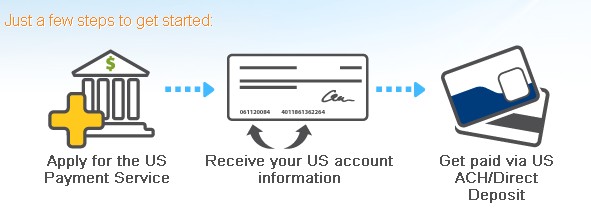 Remember that you can only receive direct deposits from select US companies also.
How To Verify Payoneer's US Payment Service:
Before using the US Payment service you will need to verify it by providing ID document. Follow the steps given below to verify your USP service:
1.Login to your Payoneer account.
2.Click on services > US Payment Service.Activate your service.
3.You will receive an email in your inbox with links to upload your ID document and a short questionnaire.
4.Follow the link to upload your ID documents. You can use your ID card or driving license. Don't worry if it is not in English. They only need government issued card.
5. Now follow the link to questionnaire. Here you will have to explain your source of income (i.e. where the money is coming from). Be specific and tell them from where and how you will receive the money. Identify the name of company from where you are expecting to receive money.
6. After 2-3 days you will receive another email saying "please send us a screenshot of your **** account profile". **** will be company you have listed in questionnaire. Provide them the screenshot.
7. It will only take 2-3 days for Payoneer staff to verify your USP service.
Note:
How To Verify Payoneer's US Payment Service:
Before using the US Payment service you will need to verify it by providing ID document. Follow the steps given below to verify your USP service:
1.Login to your Payoneer account.
2.Click on services > US Payment Service.Activate your service.
3.You will receive an email in your inbox with links to upload your ID document and a short questionnaire.
4.Follow the link to upload your ID documents. You can use your ID card or driving license. Don't worry if it is not in English. They only need government issued card.
5. Now follow the link to questionnaire. Here you will have to explain your source of income (i.e. where the money is coming from). Be specific and tell them from where and how you will receive the money. Identify the name of company from where you are expecting to receive money.
6. After 2-3 days you will receive another email saying "please send us a screenshot of your **** account profile". **** will be company you have listed in questionnaire. Provide them the screenshot.
7. It will only take 2-3 days for Payoneer staff to verify your USP service.
Note:
- Do not try to give fake information.
- Make sure that the scanned copy of ID document is clear and readable.
- The ID card number should be same to the one which you used while signup.
- Your request can be delayed if the next day is Saturday or Sunday. So be patient.
75 MB Per Day in Just Rs. 4.99 (Ufone Internet Package)
3/06/2013 05:16:00 pm
Ufone has announced a new internet package in which you can get 75 MB data per day in just Rs 4.99 + tax.
 Who really has this wonderful offer in Pakistan?? Answer is "Ufone".
How to subscribe:
SMS 'SUB' to 810 to subscribe.
Charges: Rs. 4.99 + tax per day
*As seen on Ufone Facebook page[http://www.facebook.com/ufone]*
How to subscribe:
SMS 'SUB' to 810 to subscribe.
Charges: Rs. 4.99 + tax per day
*As seen on Ufone Facebook page[http://www.facebook.com/ufone]*
Review: How To Build A Wind Generator
3/02/2013 07:51:00 pm
Read the actual review of "How to Build a Wind Generator". Is is worth buying? The idea of learning how to build a wind generator seems very fascinating and can save you 100's of dollars per month. That's why I also bought the guide "How to Build a Wind Generator". I was thinking that it will be just like other guides but I was surprised to see the it was a full blueprint on building a wind generator.
Following the exact blueprint given in the guide, I was able to built a wind generator at my home. In the first month, the wind generator saved me $300 (electricity bills). Then I also installed the generator at my home & office and in the next month, I don't next have to pay any electricity bills because wind generators were the only source of electricity. So if you are asking for: Does it works? Yes it works.


The price of is just $49.97 only. Click here to go to WindPlans website to buy the product.
Overall Rating: 10/10 (100%)
My Review: Recommended for every one who wants to reduce their power bills.
 *The above review is accurate and 100% true. I have bought the guide and implemented the ideas given in it. Recommended to every one.*
Following the exact blueprint given in the guide, I was able to built a wind generator at my home. In the first month, the wind generator saved me $300 (electricity bills). Then I also installed the generator at my home & office and in the next month, I don't next have to pay any electricity bills because wind generators were the only source of electricity. So if you are asking for: Does it works? Yes it works.
If you want to stop making the power companies richer, while your hard earned money gets tossed to the wind? Save money on your electric and power costs but letting the wind work for you. Wind Plans will teach you how to make your own wind generator and solar panels.Benefits of wind plans:
- Reduce your power bill by 50%.
- Step by step guide on how to build a wind generator and save money.
- How to get the material needed to build your own power generator
- and more...
The price of is just $49.97 only. Click here to go to WindPlans website to buy the product.
Overall Rating: 10/10 (100%)
My Review: Recommended for every one who wants to reduce their power bills.
Subscribe to:
Posts
(
Atom
)


